
Amazon S3를 사용해 공유받은 데이터 다운로드
실습 데이터 소개
https://www.ncbi.nlm.nih.gov/sra/?term=SRR6327875
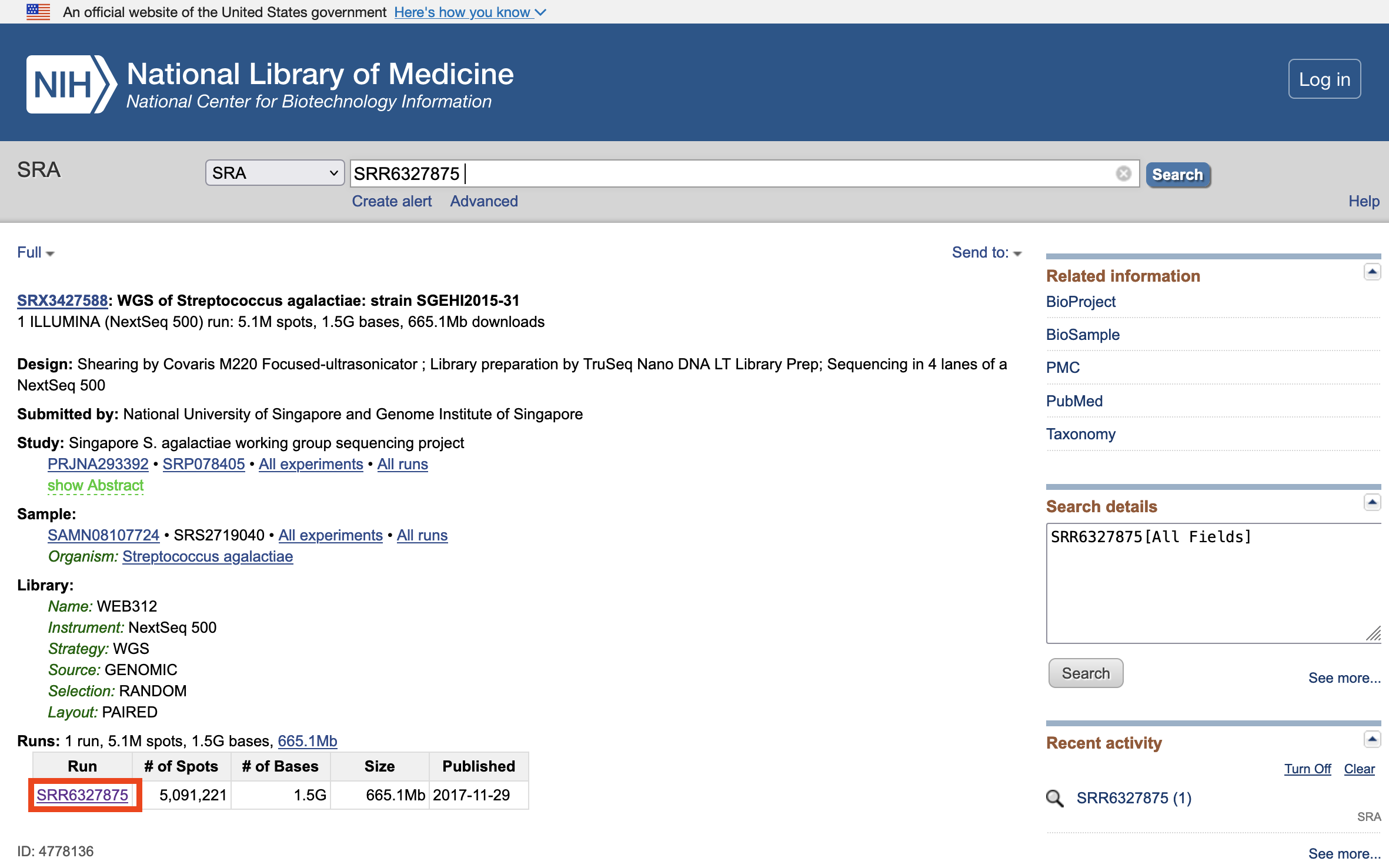
NOTE: SRA Lite 포멧에 대한 설명
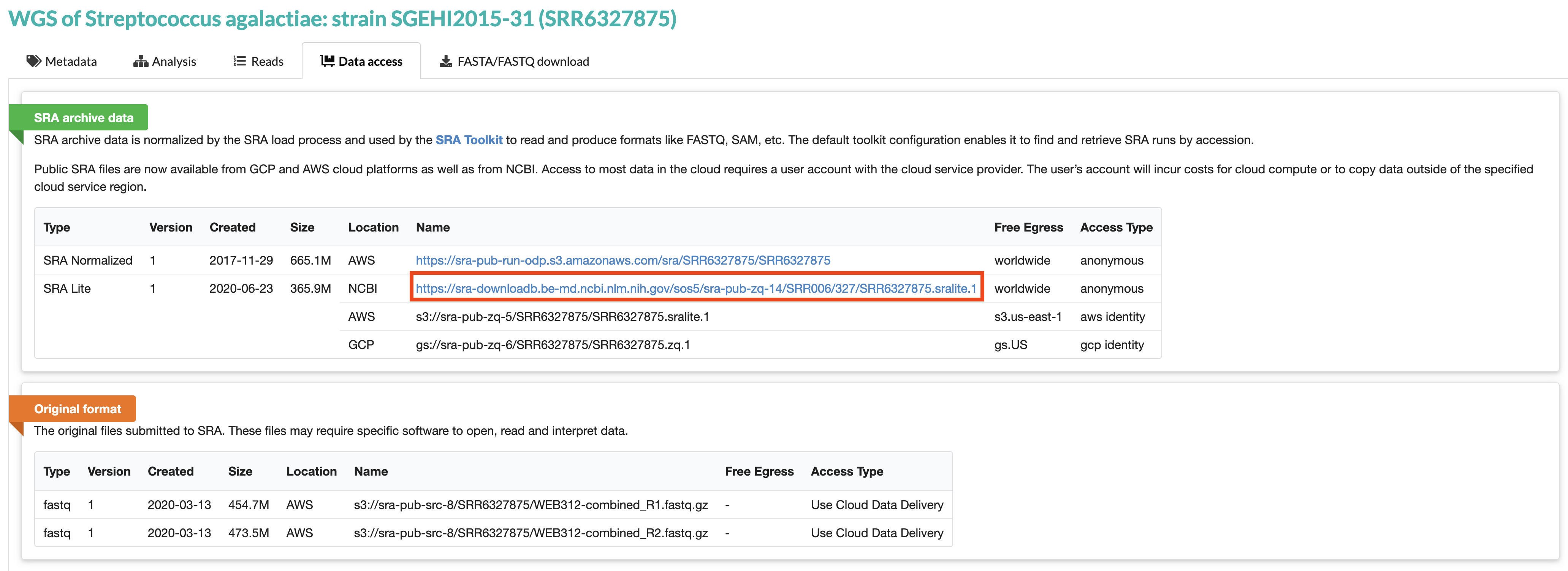
실습 데이터 준비
다운로드
wget https://sra-downloadb.be-md.ncbi.nlm.nih.gov/sos5/sra-pub-zq-14/SRR006/327/SRR6327875.sralite.1R1, R2 파일로 추출
fastq-dump --split-files --gzip SRR6327875.sralite.1AWS CLI 사용을 위한 credential 적용
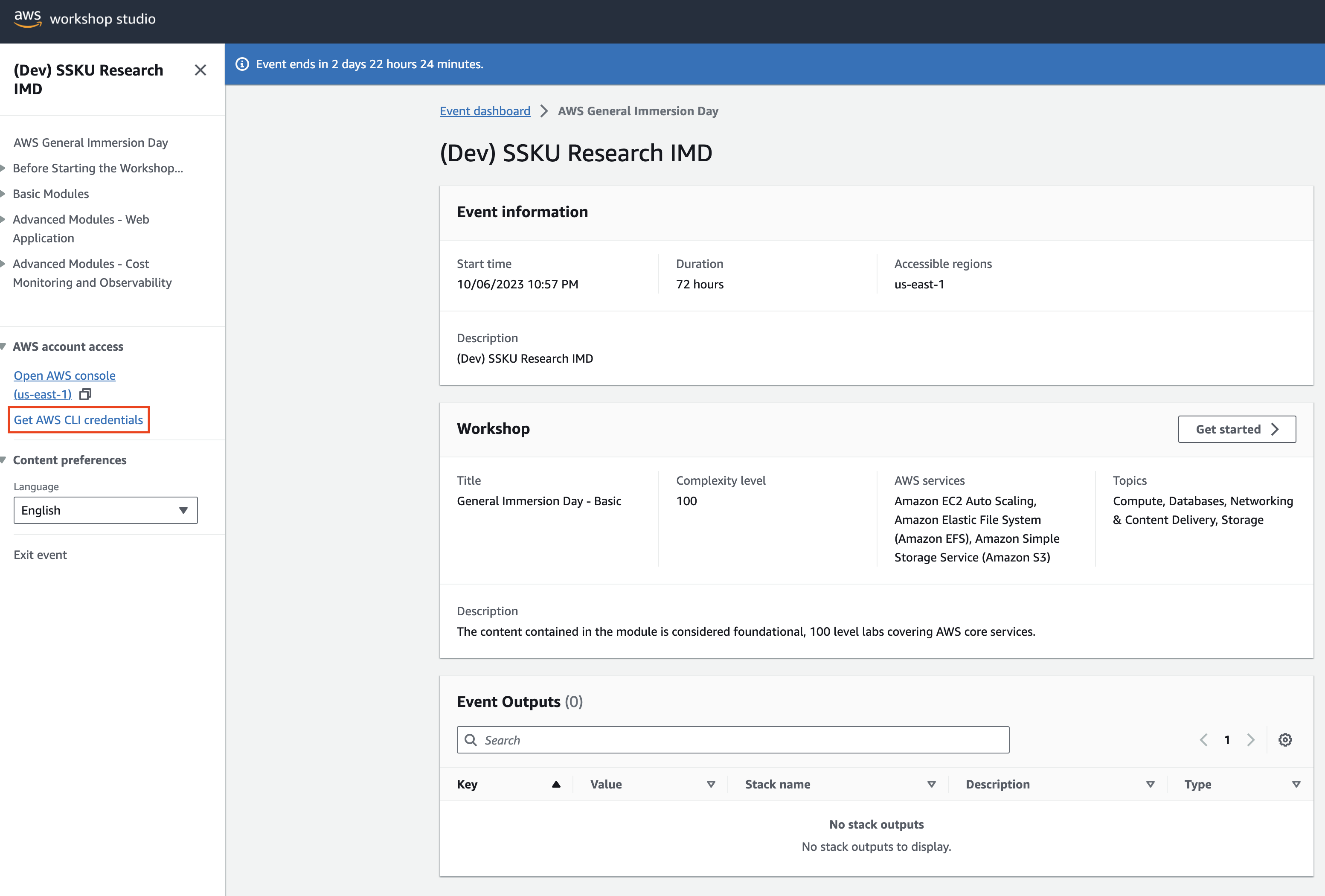
AWS에서 제공하는 워크샵 스튜디오를 통해 실습하는 경우 아래와 같이 Get AWS CLI credentials를 클릭하여 credential 정보를 얻을 수 있습니다.
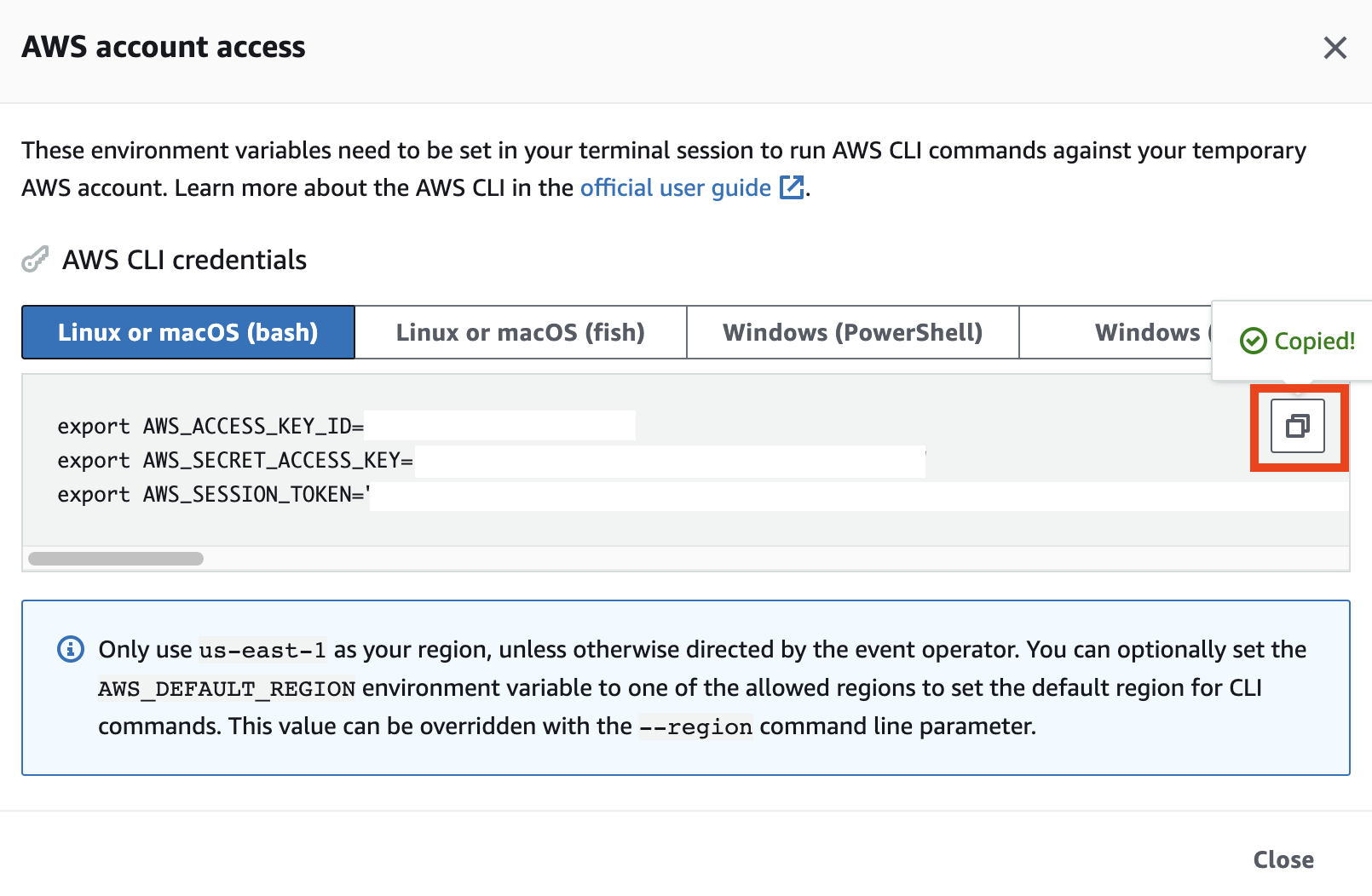
아래의 정보를 쉘에 복사하여 붙여넣습니다.
S3를 위한 AWS CLI 사용법
S3의 버킷 목록 조회
aws s3 ls버킷 생성
이때 --bucket 의 값으로는 임의로 버킷을 생성하게 됩니다. 단, 전세계 S3 사용자 누군가가 이미 사용중인 버킷명은 사용할 수 없습니다.
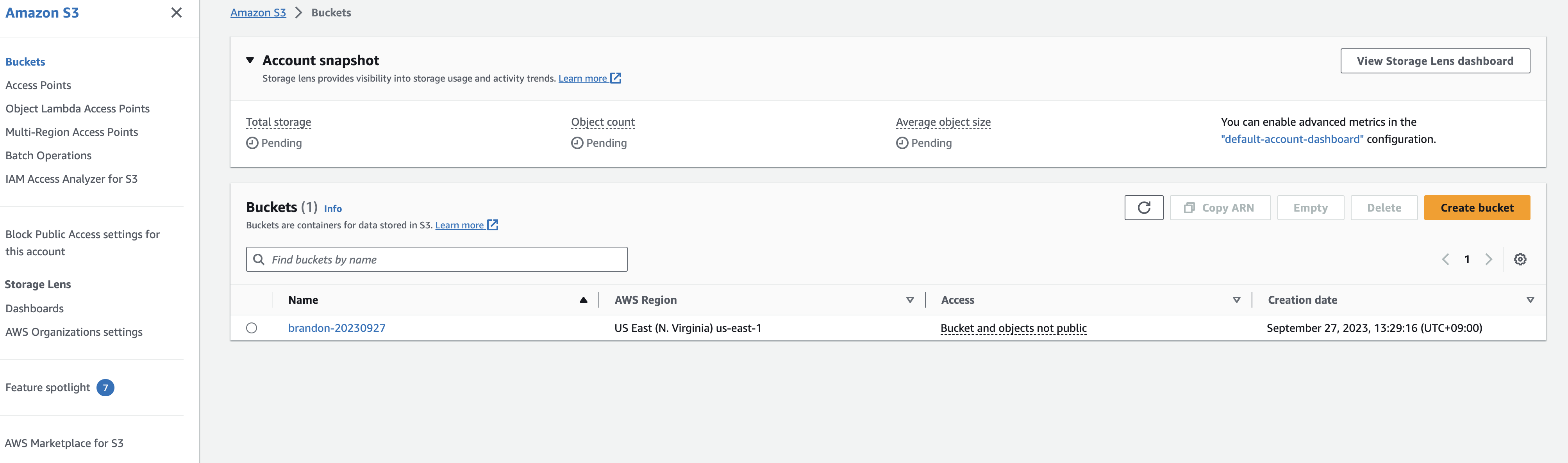
여기서는 brandon-20230927 로 예를 들었습니다.
aws s3api create-bucket \
    --bucket brandon-20230927 \
    --region us-east-1
AWS 계정 내 생성된 버킷 확인
생성된 버킷은 S3 콘솔에서도 확인할 수 있습니다.
S3로 데이터 복사
aws s3 cp SRR6327875.sralite.1_1.fastq.gz s3://brandon-20230927/raw/SRR6327875_1.fastq.gz
aws s3 cp SRR6327875.sralite.1_2.fastq.gz s3://brandon-20230927/raw/SRR6327875_2.fastq.gz
S3 버킷에서 데이터 다운로드
이제 공유 S3 버킷에 액세스할 수 있으므로 S3 버킷에서 사용자 컴퓨터로 데이터를 다운로드합니다.
aws s3 ls s3://{앞에서 만들었던 버킷명}/raw/SRR6327875_1.fastq.gz --region us-east-1예) aws s3 ls s3://brandon-20230927/raw/SRR6327875_1.fastq.gz --region us-east-1
이제 이 폴더 내의 특정 위치에서 컴퓨터로 파일을 복사하겠습니다. 그 전에 이 데이터를 저장할 디렉터리를 컴퓨터에 만들어 보겠습니다.
mkdir -p /tmp/fastq/SRR6327875cd /tmp/fastq/SRR6327875aws s3 cp s3://brandon-20230927/raw/SRR6327875_1.fastq.gz .aws s3 cp s3://brandon-20230927/raw/SRR6327875_2.fastq.gz . --region us-east-1md5sum *.fastq.gz
The original MD5 hashes for these files are:
SRR6327875_2.fastq.gz - 59291590092404bb2f29bc0e753533fb
5. Download another data set using from the NCBI SRA repository on S3 (in the AWS Repository of Open Data):
mkdir -p /tmp/fastq/SRR6327950
cd /tmp/fastq/SRR6327950

# note here the --no-sign-request makes an anonymous request to this public S3 bucket
aws s3 sync --no-sign-request s3://sra-pub-run-odp/sra/SRR6327950/ /tmp/fastq/SRR6327950/

# convert the sra formatted file to fastq, then gzip them and clean up
fasterq-dump ./SRR6327950
(Optional) 아래와 같이 준비할 수도 있음
mkdir -p /tmp/fastq/SRR6327875
cd /tmp/fastq/SRR6327875

# note here the --no-sign-request makes an anonymous request to this public S3 bucket
aws s3 sync --no-sign-request s3://sra-pub-run-odp/sra/SRR6327875/ /tmp/fastq/SRR6327875/

# convert the sra formatted file to fastq, then gzip them and clean up
fasterq-dump ./SRR6327875
gzip SRR6327875_1.fastq
gzip SRR6327875_2.fastq
rm -f SRR6327875
We are now ready to run some data analyses.