
AWS 계정 안전하게 지키기
AWS Well-Architected helps cloud architects build a secure, high-performing, resilient, and efficient infrastructure for their applications and workloads. The Security Baseline Workshop aligns to the security pillar of the AWS Well-Architected Framework. The security pillar describes how to take advantage of cloud technologies to protect data, systems, and assets in a way that can improve your security posture. This helps you meet your business and regulatory requirements by following current AWS recommendations.
You can assess your adherence to Well-Architected best practices using the Well-Architected Tool in your AWS account.
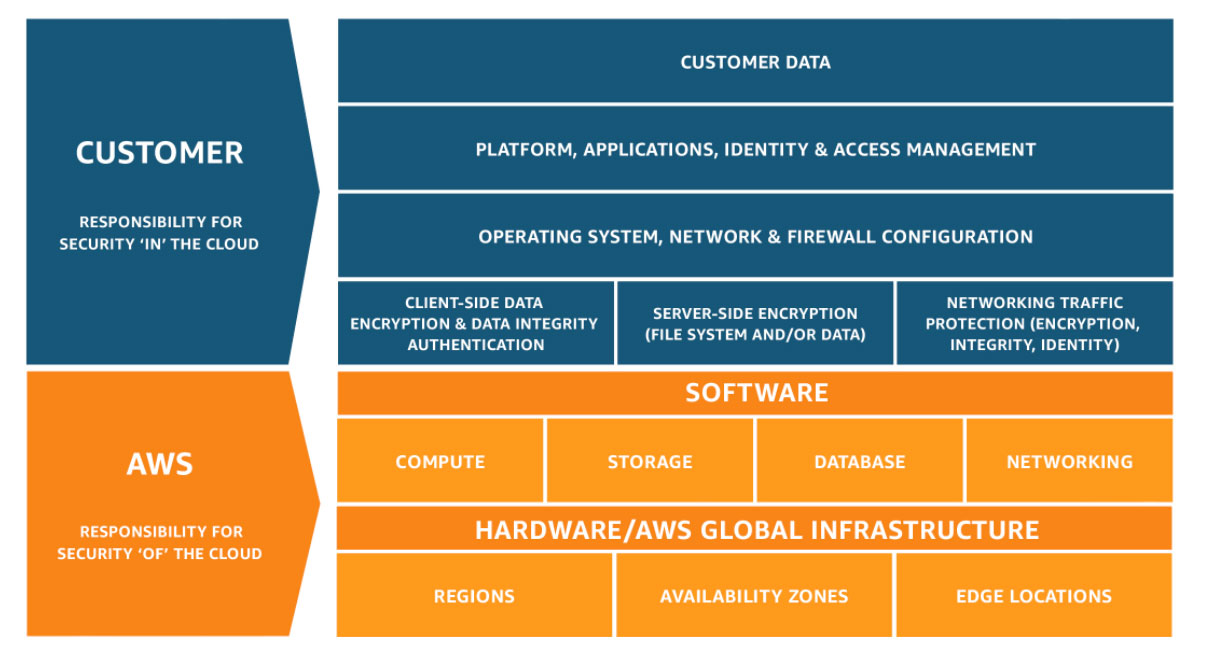
Security and compliance are a shared responsibility between AWS and the customer. The shared responsibility model
is often described by saying that AWS is responsible for the security of the cloud (that is, for protecting the infrastructure that runs all the services offered in the AWS Cloud), and you are responsible for the security in the cloud (as determined by the AWS Cloud services that you select). In the shared responsibility model, implementing the security controls in this document is part of your responsibility as a customer.
1. MFA on Root account
Action Plan - Protect the Root User 구성 가이드
10분안에 정복하는 안전한 계정 관리를 위한 IAM 모범 사례
2. Amazon S3 Bucket Permissions
Action Plan - Prevent Public Access to Private S3 Buckets 구성 가이드
Action Plan - 공개 액세스 접근으로 노출된 S3 버킷 확인
3. Security Groups - Specific Ports Unrestricted
4. CloudTrail
Action Plan - Turn CloudTrail On 구성가이드
5. IAM Password Policy
Action Plan - Set a password policy to ensure strong passwords 구성가이드
6. IAM Access key rotation
AWS Config를 활용한 Access Key 자동 교환 구성하기
AWS Credential Report 로 AWS Account에서 발행한 전체 Access Key 상태 확인하는 방법
Note, AWS 계정을 파트너사에서 관리하는 경우 관련 설정이 파트너사 별로 다를 수 있으니 이런 경우, 파트너사로 문의하시기 바랍니다.
참고 자료
10분안에 정복하는 안전한 계정 관리를 위한 IAM 모범 사례 (Youtube)
AWS Perspective Guidance on Baseline Security
No comments to display
No comments to display